Skip to content

Docs

Everything the tokengraph CLI does, from the first npx tokengraph to the last option. Written for version 0.1.0; every command also takes --help.

Getting startedLink to this section

tokengraph needs Node.js 22 or newer (22.13 or newer to read OpenCode, Kilo CLI, Copilot CLI and Goose, which keep their usage in a database, and for the Cursor fetch). It runs on macOS and Linux, and on Windows with rough edges. Try it without installing anything:

npx tokengraph

That opens the terminal view of every agent it finds on this machine. Nothing is sent anywhere, and nothing needs logging in. When you want the graph on your GitHub profile, and story cards for your phone:

Publish your graph to a gist on your GitHub and get the README snippet
npx tokengraph login
Turn your usage into story cards and send them to your phone
npx tokengraph story

To keep the graph current without thinking about it, install it once and turn on the hourly sync:

npm install -g tokengraph && tokengraph schedule

The terminal viewLink to this section

tokengraph (or tokengraph view) opens a live view in your terminal. It reads the logs on this machine only and rescans while it is open. It has five tabs:

  • Overview: today, this week (against the week before), your streak and longest streak, the estimated cost of the last 30 days and what prompt caching saved you in them, a year heatmap coloured by model family, and your top models.
  • Models: every model on its own over 7 days, 30 days, 90 days, 1 year or all time, with its input, output, cache write and cache read counts.
  • Agents: the same, split by agent. h manages the hooks of the agents that have one.
  • Insights: longest streak, record day, favourite model, busiest hour and active days; “When you code”, a sentence naming the part of the day you use AI in, with one bar per hour (← → or the mouse picks an hour and shows its share); your busiest weekday; and the last 12 months.
  • Setup: everything that manages this machine, in one list. Connect GitHub or sync and publish, copy the README snippet, switch the graph colours, turn each agent’s hook and the hourly sync on or off, manage the Cursor fetch, make story cards, export, show the status or uninstall. The steps that suit the agents you use are marked as recommended, and each action shows the command that does the same from the shell.

The command palette (: or Ctrl-K) has the same actions plus the tabs and the view’s own commands; type to filter it. The view publishes only when you pick an action that does (sync, login or graph colours); opening and rescanning never touch the network.

Keys

1-5, Tab, click
Switch tab (5 is Setup)
↑ ↓, mouse
Move the day cursor or the row selection
← →
Move the day cursor by a week (Overview); previous or next range (Models, Agents); pick an hour (Insights)
[ ]
Previous or next year (Overview)
t
Jump to today
r
Next range (Models, Agents)
h
Manage the agent hooks (Agents)
Enter
Run the selected action (Setup)
c
Switch between family colours and a single colour
s
Rescan now
: or Ctrl-K
Open the command palette
?
Show or hide the keys
q, Esc, Ctrl-C
Quit

tokengraph view --print prints a static snapshot instead (the tiles, the heatmap, the top five models and your busiest hour), which is also what you get when the output is not a terminal. See view for the other options.

Your README graphLink to this section

tokengraph login connects GitHub and publishes your graph. If the GitHub CLI is logged in, it offers to use that login; otherwise it shows a one-time code to approve at github.com/login/device. Either way it asks for gist access only. It then publishes the graph to a public gist on your GitHub, copies the README snippet to your clipboard and, in a terminal, offers to turn on the hourly sync.

Paste the snippet into your profile README (the repository named after your GitHub login). tokengraph readme prints it again at any time:

An example; yours has your login and gist id
<a href="https://github.com/altindalorcun/tokengraph"> <picture> <source media="(prefers-color-scheme: dark)" srcset="https://gist.githubusercontent.com/octocat/a1b2c3d4e5f6a7b8c9d0/raw/tokengraph-dark.svg"> <img alt="My AI coding token usage, made with tokengraph" src="https://gist.githubusercontent.com/octocat/a1b2c3d4e5f6a7b8c9d0/raw/tokengraph-light.svg"> </picture> </a>

The graph switches between light and dark with the reader’s GitHub theme, and every sync updates the same gist, so the snippet never changes. It shows the last 52 weeks, one square a day, with a strip of five figures: today, your streak (and longest streak), your best day, active days, and the family that led the most days. Shades are measured against your own busy and quiet days, not a fixed scale.

Colours

Each day takes the colour of the model family that did most of that day’s work. Models that fit none of the families count as “Other models”.

  • Claude
  • GPT
  • Gemini
  • DeepSeek
  • Qwen
  • GLM
  • Kimi
  • Grok
  • Composer
  • Mistral
  • Llama
  • MiniMax
  • Other models

tokengraph readme --colors single draws the graph in one colour instead (the fifth figure becomes the average active day), and --colors model switches back. Both republish. --compact prints a snippet for a smaller graph without labels and legends.

Keeping it currentLink to this section

tokengraph sync reads every agent’s logs into the local ledger and, when you are logged in, publishes. It reads the last 90 days by default (--since 400 reaches further back), and --local never touches the network. You rarely need to run it yourself, because two kinds of background sync run it for you:

The hourly scheduleLink to this section

tokengraph schedule installs an hourly sync: launchd on macOS, cron on Linux, Task Scheduler on Windows. It is the only background sync for Cline, OpenCode, Kilo CLI, Copilot CLI, pi, Qwen Code and Goose, which have no hook. tokengraph schedule --remove turns it off.

Agent hooksLink to this section

Four agents can start a background sync themselves when they finish:

--agent claude-code
When a session ends (SessionEnd; pick another event with --event)
--agent codex
After a turn, at most every 10 minutes
--agent cursor
When the agent stops; restart Cursor after installing
--agent gemini-cli
When a session ends; other hooks in its settings are left alone

Install one with tokengraph install-hook --agent <name>, preview it with --dry-run and remove it with --remove. tokengraph status shows which hooks and schedule are installed and whether they have run.

Where agents keep their filesLink to this section

Every agent is read from its default folder plus any folder its environment variable names (such as $CLAUDE_CONFIG_DIR or $CODEX_HOME). tokengraph remembers such a folder the first time a command runs with it set, so the hourly sync and the hooks, which do not get your shell’s environment, still read it. tokengraph status lists the folders it scans and whether they exist.

Story cardsLink to this section

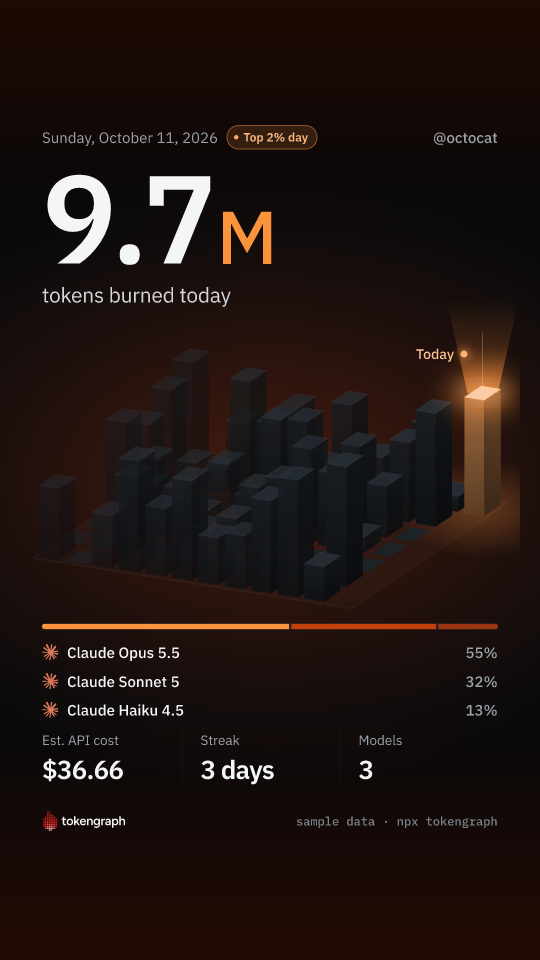
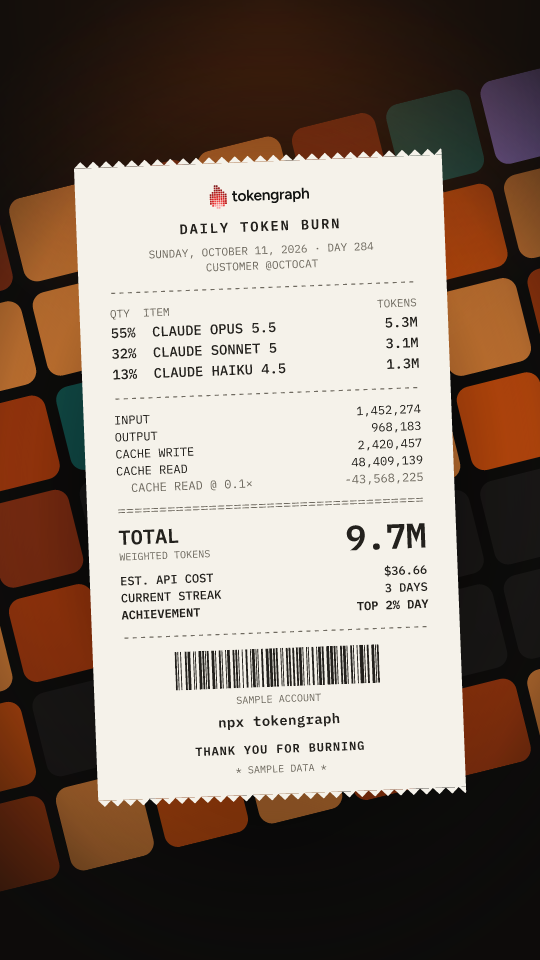
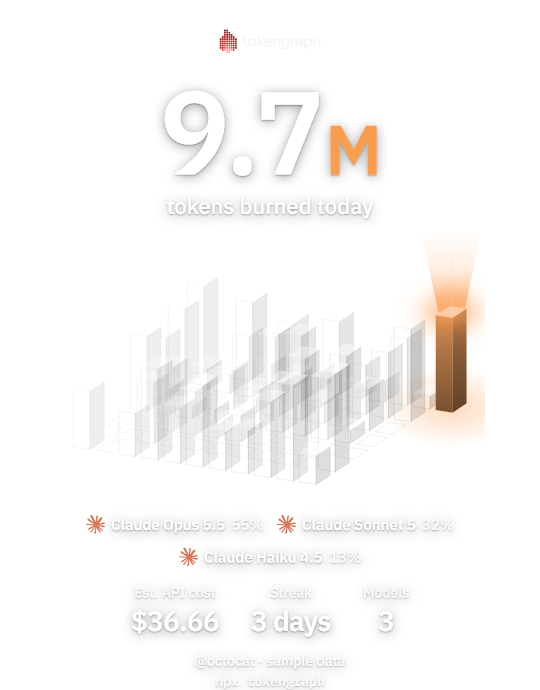
tokengraph story draws three cards sized for Instagram and TikTok stories and saves them as PNG files in your Downloads folder:

  • The Skyline story card, sample data

    Skyline. Your weeks as a city of towers, with the latest day lit up.

  • The Receipt story card, sample data

    Receipt. A receipt of the models you ran, one line each.

  • The Sticker story card, sample data

    Sticker. A transparent sticker with the total, to lay over a photo.

It asks which period to cover: today, 7 days, 30 days or 12 months. --range today|7d|30d|1y skips the question, --template draws only one card, and --no-cost leaves the estimated cost off.

Sending them to your phone

After saving, it offers to send them to your phone with a QR code. Scan it with your phone on the same Wi-Fi and save the cards to Photos from the page that opens. Your computer serves the files to your phone itself, from memory and under a random address, until every card is saved or after 10 idle minutes. Nothing is uploaded anywhere. --qr skips the question and --no-qr only saves the files.

How tokens are countedLink to this section

tokengraph reads the usage counters the agents already write to disk, never your prompts or answers. Each day’s number is a weighted token count:

weighted tokens = input + output + cache writes + 0.1 × cache reads

Cache reads cost a fraction of fresh input, so they count a tenth. Without that, one long session re-reading a big cached context would drown a day of real work. It measures work, not a bill.

  • No double counting. Agents write the same message several times while streaming, and resumed or forked sessions copy earlier records. tokengraph dedups by each agent’s own message or response id, and never counts usage another agent’s logs already count.
  • Totals only grow. The ledger keeps the largest count it has seen for each day, so a day survives after the agent deletes its transcript, and a smaller rescan never lowers it.
  • Checked against real agents. Every agent but Cursor was run for real against a fake model server, and the tokens tokengraph counted matched what the server sent, on every protocol each agent supports.

Estimated costLink to this section

The view, story cards and export show an estimated cost at public API list prices, from a dated price table. It is not what you were billed, which depends on your plan. Claude, GPT and the o-series, Gemini, Grok and Cursor’s Composer are priced. Open-weight models (DeepSeek, Qwen, Llama, Mistral, MiniMax and the like) and models whose vendor publishes no price are left unpriced: never counted as $0, so a total is a lower bound.

Supported agentsLink to this section

Eleven agents, each read from its own files on this machine. Aider is not supported, because its local history rounds token counts. New agents arrive as adapter pull requests (opens in a new tab).

  • Claude Code

    Reads
    ~/.claude/projects and transcripts (also $CLAUDE_CONFIG_DIR), and the Code and Cowork sessions of the Claude desktop app
    Stays current
    Hook: tokengraph install-hook --agent claude-code syncs when a session ends
    • Claude Code deletes transcripts after 30 days by default, so sync at least every few weeks.
  • Codex CLI

    Reads
    ~/.codex/sessions and archived_sessions (also $CODEX_HOME)
    Stays current
    Hook: tokengraph install-hook --agent codex syncs after a turn, at most every 10 minutes
    • The hook never overwrites a notify setting that is not its own.
  • Cursor

    Reads
    Your own usage history from cursor.com, plus the events its stop hook writes on this machine
    Stays current
    Hook: tokengraph install-hook --agent cursor, then restart Cursor
    • Cursor keeps no usable token counts on disk. See Cursor for how the fetch, the hook and the CSV import fit together.
  • Gemini CLI

    Reads
    ~/.gemini/tmp/*/chats, and ~/.cache/.gemini/tmp from the macOS sandbox (also under $GEMINI_CLI_HOME)
    Stays current
    Hook (optional): tokengraph install-hook --agent gemini-cli syncs when a session ends; the schedule also covers it
    • Gemini CLI deletes sessions after 30 days by default, so sync at least monthly.
    • It never records some side calls, so its totals are a lower bound.
  • Cline

    Reads
    saoudrizwan.claude-dev/tasks in VS Code-family editors (VS Code, Cursor, VSCodium, Windsurf, Positron, Trae, Kiro, Antigravity and others, remote servers included), and ~/.cline/data
    Stays current
    Hourly, with tokengraph schedule
    • Requests Cline sends through the Claude Code provider are skipped, because Claude Code’s own logs already count them.
    • Cline stores output tokens without the reasoning tokens some providers report inside them, so those are not counted.
  • OpenCode

    Reads
    ~/.local/share/opencode/opencode*.db and the older storage/ folder (also $XDG_DATA_HOME; $OPENCODE_DB adds one database)
    Stays current
    Hourly, with tokengraph schedule
    • Needs Node.js 22.13 or newer.
    • Records from before OpenCode 1.3.16 that cannot be read with certainty are skipped and reported.
  • Kilo CLI

    Reads
    ~/.local/share/kilo/kilo*.db (also $XDG_DATA_HOME; $KILO_DB adds one database)
    Stays current
    Hourly, with tokengraph schedule
    • Kilo Code 7.x in VS Code writes the same database, so it is counted here too.
    • Needs Node.js 22.13 or newer. Records from before Kilo 7.2.6 that cannot be read with certainty are skipped and reported.
  • Copilot CLI

    Reads
    ~/.copilot/session-store.db (also $COPILOT_HOME)
    Stays current
    Hourly, with tokengraph schedule
    • Needs Copilot CLI 1.0.70 or newer and Node.js 22.13 or newer.
    • Only the CLI’s own database is read, not the Copilot Chat extension in VS Code.
  • pi

    Reads
    ~/.pi/agent/sessions (also $PI_CODING_AGENT_DIR and $PI_CODING_AGENT_SESSION_DIR)
    Stays current
    Hourly, with tokengraph schedule
    • Forked sessions share earlier requests, which are counted once.
    • Compaction and branch-summary calls name no model, so they are skipped and reported.
  • Qwen Code

    Reads
    ~/.qwen/projects (chats and background subagents) and Qwen Code’s own usage ledger in ~/.qwen/usage (also under $QWEN_HOME and $QWEN_RUNTIME_DIR)
    Stays current
    Hourly, with tokengraph schedule
    • Chats forked with /branch copy earlier requests, which are counted once.
    • Cache writes are not recorded separately, so they count as ordinary input.
    • Background subagent transcripts are deleted after 30 days by default, so sync at least monthly.
  • Goose

    Reads
    ~/.local/share/goose/sessions/sessions.db (also $XDG_DATA_HOME or $GOOSE_PATH_ROOT; %APPDATA%\Block\goose\data on Windows)
    Stays current
    Hourly, with tokengraph schedule
    • Needs a Goose version with a per-request usage ledger, and Node.js 22.13 or newer.
    • Sessions that drive Claude Code, Codex, Gemini CLI, Cursor, Copilot CLI or pi through Goose are left out, because those agents’ own logs already count them.

CursorLink to this section

Cursor keeps no usable token counts on disk, so tokengraph has three ways to get them:

  • The fetch from cursor.com. When Cursor is logged in on this machine, tokengraph sync fetches your own usage history from cursor.com, the same file cursor.com’s Export CSV button gives you, at most once an hour. It covers every machine, the editor, the CLI and cloud agents, so it is counted once however many machines fetch it. The first fetch reads your whole history.
  • The hook. tokengraph install-hook --agent cursor (then restart Cursor) records each turn on this machine as it happens, to fill the hours before cursor.com has them.
  • A CSV import. With the fetch off, download the usage CSV from cursor.com (Usage, then Export CSV) and run tokengraph import cursor <file.csv>, on one machine only.

Several machinesLink to this section

Log in on each machine with the same GitHub login. Each machine writes its own file, machine-<id>.json, to a secret gist on your GitHub. When one syncs, the graph is built from its own ledger plus every other machine’s file, summed per day and model, so a laptop and a desktop show up as one graph.

The same files are a backup: after a reinstall or a wiped ~/.tokengraph, tokengraph login recognises the machine, restores its history and counts nothing twice. tokengraph export --all-machines adds the other machines to an export.

Your dataLink to this section

Your usage stays on this machine until you run tokengraph login. After that, publishing (a sync, a hook, the schedule, login, readme --colors, or the same actions in the terminal view) writes to two gists on your own GitHub:

  • a public gist with the graph SVGs (daily totals and the names of the families they are coloured by) and a short README;
  • a secret gist with one file per machine: daily token counts per agent, model and pricing tier, a random machine id, a label such as darwin-3f2a1c, a hashed machine fingerprint, the CLI version and the time of the last update; with the Cursor fetch, also your Cursor account’s daily counts per model under a hashed account key.

Which hour of the day you work stays on this machine: it is used by the view and export --hours and never published. Prompts, answers, code, file names and paths are never read. There is no tokengraph server. The privacy page has the details.

The one other thing that goes over the network is the Cursor fetch, which reads your own usage from cursor.com while Cursor is logged in and is off with tokengraph cursor off.

Removing itLink to this section

  • tokengraph uninstall removes the hooks and the hourly schedule; add --purge to also delete tokengraph’s own files in ~/.tokengraph. Then npm uninstall -g tokengraph.
  • tokengraph logout forgets the GitHub login on this machine.
  • Delete the two gists on gist.github.com (opens in a new tab) to remove what was published.

Command referenceLink to this section

Every command takes --help, and an unknown option is an error. tokengraph --version prints the version.

tokengraph [view]

Opens the live terminal view of your usage. It reads local data only, and publishes only when you pick an action that does in its Setup tab or command palette (sync, login or graph colours). It is what plain tokengraph runs in a terminal.

--print
Print a static snapshot and exit (the default when the output is not a terminal)
--no-motion
Skip animations
--no-live
Do not rescan while the view is open
--theme <name>
auto, dark or light (default: auto)

tokengraph sync

Reads every agent’s local data into the ledger (~/.tokengraph/state.json) and, when you are logged in, publishes your graph to your gist. When Cursor is logged in on this machine, it first fetches your Cursor usage from cursor.com, at most once an hour. Hooks and the schedule run this same command in the background.

--since <days>
How far back to read, 1 to 400 (default: 90)
--local
Update the local ledger only and never touch the network (no publish, no Cursor fetch)

tokengraph login

Connects GitHub so your graph can be published to your own gist, publishes it once and prints the README snippet. If the GitHub CLI is logged in it offers to use that login, otherwise you approve a one-time code in the browser. It asks for gist access only, and in a terminal it offers to turn on the hourly sync.

--gh
Use the GitHub CLI login without asking (it needs the gist scope: gh auth refresh -s gist)
--device
Always use a one-time code, even when the GitHub CLI is logged in
--no-open
Do not open the browser for the code

tokengraph readme

Prints the snippet that puts your graph in a GitHub README and copies it to the clipboard.

--compact
A smaller graph without labels and legends
--colors <mode>
model (each day in its model family’s colour) or single (one colour); changing it republishes

tokengraph logout

Forgets the GitHub login and gist ids on this machine. The local ledger and the machine id are kept, and your gists stay on GitHub.

tokengraph status

Shows the GitHub login, the local ledger, your machines, the Cursor fetch, which hooks and schedule are installed and whether they ran, the folders each agent is read from (and which exist), and how long Claude Code, Gemini CLI and Qwen Code keep their logs.

--json
Print one JSON object instead, for scripts and AI agents. It includes the secret gist’s address and local paths, so do not paste it in public.

tokengraph install-hook --agent <name>

Makes an agent start a background sync when it finishes, so your graph stays current.

--agent <name>
claude-code, cursor, codex or gemini-cli (required)
--remove
Remove the hook
--dry-run
Show the resulting settings without writing them
--event <name>
The Claude Code hook event: SessionEnd, Stop or SubagentStop (default: SessionEnd)

tokengraph schedule

Runs a sync every hour in the background: launchd on macOS, cron on Linux, Task Scheduler on Windows. It covers the agents that have no hook, and the Cursor fetch.

--remove
Remove the hourly sync
--dry-run
Show what would be installed without changing anything

tokengraph story

Draws your usage as Instagram and TikTok story cards, saves them as PNG files and can send them to your phone with a QR code. Reads local data only.

--template <name>
skyline, receipt, sticker or all (default: all)
--range <range>
today, 7d, 30d or 1y (default: asks in a terminal, otherwise today)
--no-cost
Leave the estimated API cost off the cards
--out <dir>
Where to save the cards (default: your Downloads folder)
--qr
Send them to your phone without asking
--no-qr
Only save the files
--no-preview
Do not draw the cards in the terminal
--handle <name>
The name on the cards (default: your GitHub login, or your computer’s user name when you are not logged in)

tokengraph export

Writes your usage from the local ledger, one row per day, agent, model and pricing tier, with weighted tokens and the estimated cost. It never publishes; run tokengraph sync --local first for the newest numbers.

--format <csv|json>
Output format (default: csv)
--out <file>
Write to a file instead of the terminal
--since <date>
Only days on or after this date (YYYY-MM-DD)
--all-machines
Add your other machines, as of the last publish
--hours
One row per day, local hour and agent instead (this machine only)

tokengraph cursor <fetch|on|off>

Controls the Cursor fetch from cursor.com. It is on by default when Cursor is logged in on this machine.

fetch
Fetch now, ignoring the hourly pause (not the pause after an expired login or a rate limit)
on
Let sync fetch (the default)
off
Never read Cursor’s login or call cursor.com. Usage already fetched stays.

tokengraph import cursor <file.csv>

Adds Cursor history from a usage CSV you download from cursor.com yourself (Usage, then Export CSV), for when the fetch is off. Importing the same or an overlapping file twice adds nothing twice. Import on one machine only: machines are added together, so the same file on two machines counts twice. import cursor --fetch does the same as cursor fetch.

tokengraph uninstall

Removes everything tokengraph installed on this machine: the Claude Code, Cursor, Codex and Gemini CLI hooks and the hourly schedule. Your gists and your agents’ own data are never touched.

--purge
Also delete tokengraph’s own files in ~/.tokengraph: the ledger, the login, logs and the Cursor files. Anything else in that folder is kept.
--yes
Do not ask before deleting (needed for --purge outside a terminal)
--dry-run
Show what would change and change nothing

FAQLink to this section

Why gists?

They are free, they are yours, GitHub serves and caches the images, and there is no server for anyone to run, trust or shut down. If tokengraph disappears tomorrow, your graph keeps working.

Does it work offline?

Yes. view, story, status, export, import <file> and sync --local never use the network. Only publishing needs GitHub, and the Cursor fetch needs cursor.com.

Why is my number lower than my bill?

Cache reads count a tenth, and the estimated cost uses list prices, not your plan. Some agents also leave calls out of their logs (see the notes under Supported agents).

Can I export my data?

tokengraph export writes CSV or JSON, one row per day, agent, model and pricing tier, with weighted tokens and the estimated cost. --hours writes hour-of-day rows instead.

Windows?

Paths, hooks and the hourly Task Scheduler job are written for Windows, but tokengraph is developed on macOS and Linux, so expect rough edges and please open an issue (opens in a new tab).